Architecture Diagrams (infra v2)
This repository documents the platform infrastructure for Prefect running on AWS using a single-root Terraform stack under infra/platform/infra/envs/prod.
To keep diagrams close to the code, we generate them from a small Python script and store the outputs under apps/docs/public/diagrams/.
Files involved
infra/platform/architecture.yaml– high-level, human-readable description of the current architecture (VPC, ALB, CloudFront, ECS, Aurora, S3, DNS, external services like Vercel and Neo4j Aura).infra/platform/generate_architecture_diagram.py– uses thediagramslibrary to render a small set of PNG diagrams.apps/docs/public/diagrams/– generated PNG images referenced from this page.
Available diagrams
0. Overview
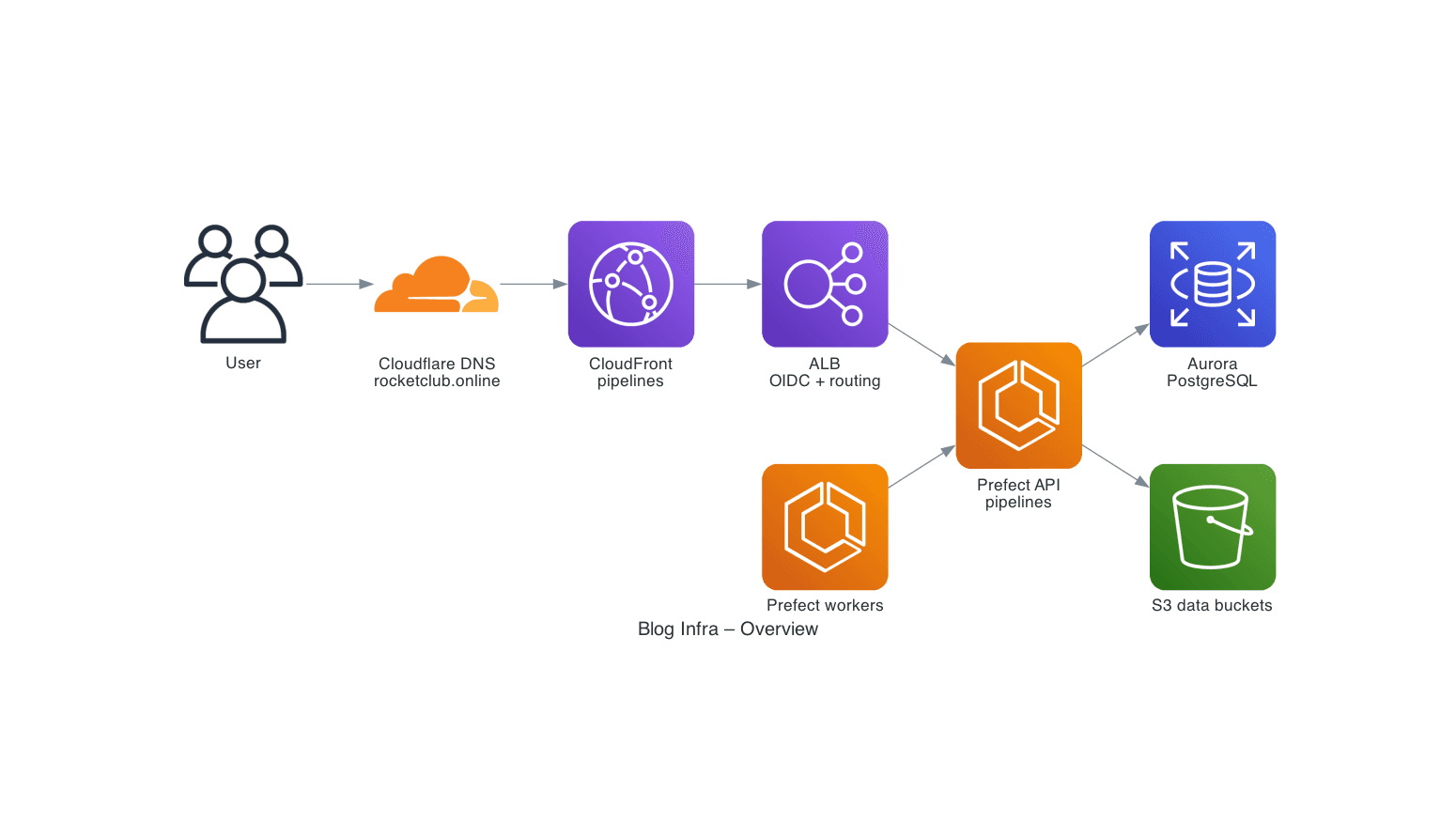
Purpose: high-level view of the infra v2 stack.
Shows:
- Users → Cloudflare DNS → CloudFront → ALB
- Routing to Prefect (
pipelines.rocketclub.online) - Prefect workers calling the Prefect API
- Aurora and the S3 data buckets
- Neo4j Aura and Cloudinary as external data stores
- Web app (
apps/web) frontend on Vercel querying Neo4j Aura and Cloudinary and using S3 for assets
1. HTTPS and Auth Flow
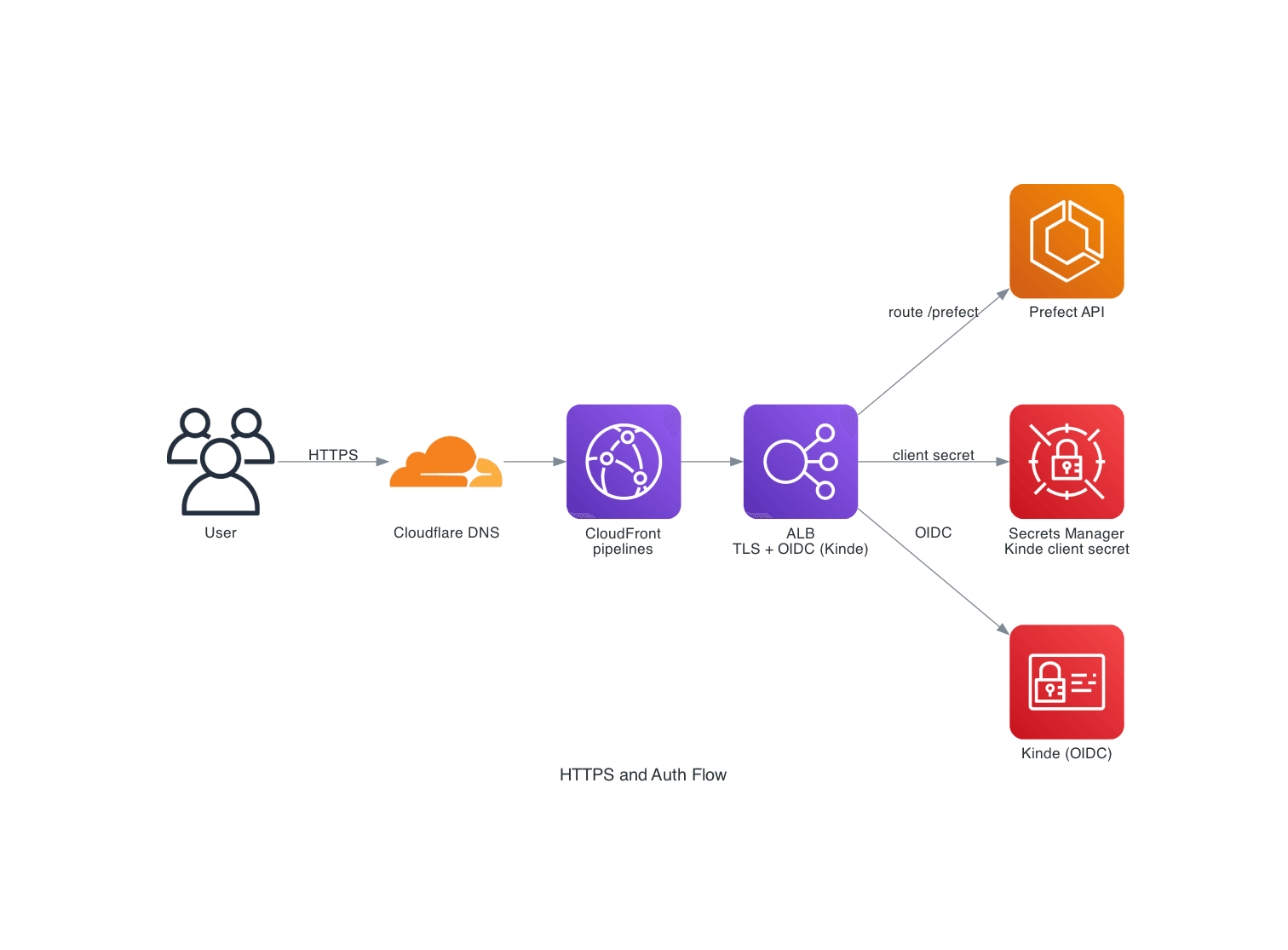
Purpose: how HTTPS and OIDC authentication work for the apps.
Shows:
- Cloudflare and CloudFront handling the
pipelines.hostname - ALB terminating TLS and performing OIDC with Kinde
- Routing to the Prefect ECS service
- Use of Secrets Manager for the Kinde client secret
2. Prefect Orchestration
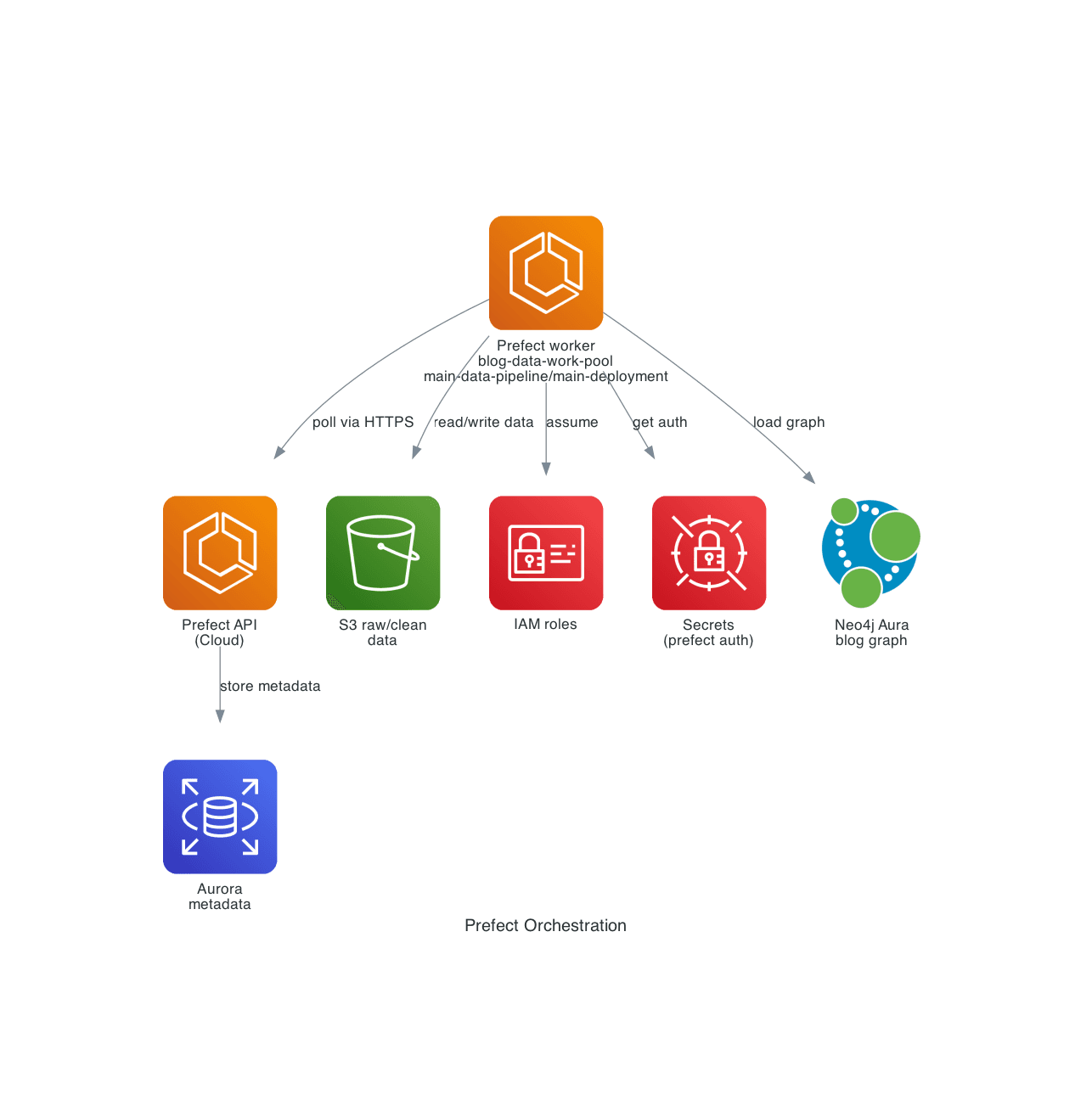
Purpose: how Prefect workers interact with the API and data stores.
Shows:
- Prefect API service (self-hosted Prefect 3 on ECS)
- Prefect worker service on ECS polling the
blog-data-poolwork pool main-data-pipeline/main-deploymentdeployment running on that work pool- The daily schedule (when enabled) attached to that deployment
- Aurora as the metadata database
- S3 buckets for raw/clean data
- Neo4j Aura as the external graph database
- The web app (
apps/web) as a downstream consumer - IAM roles and Secrets Manager used by the workers
3. Data Pipeline Flow
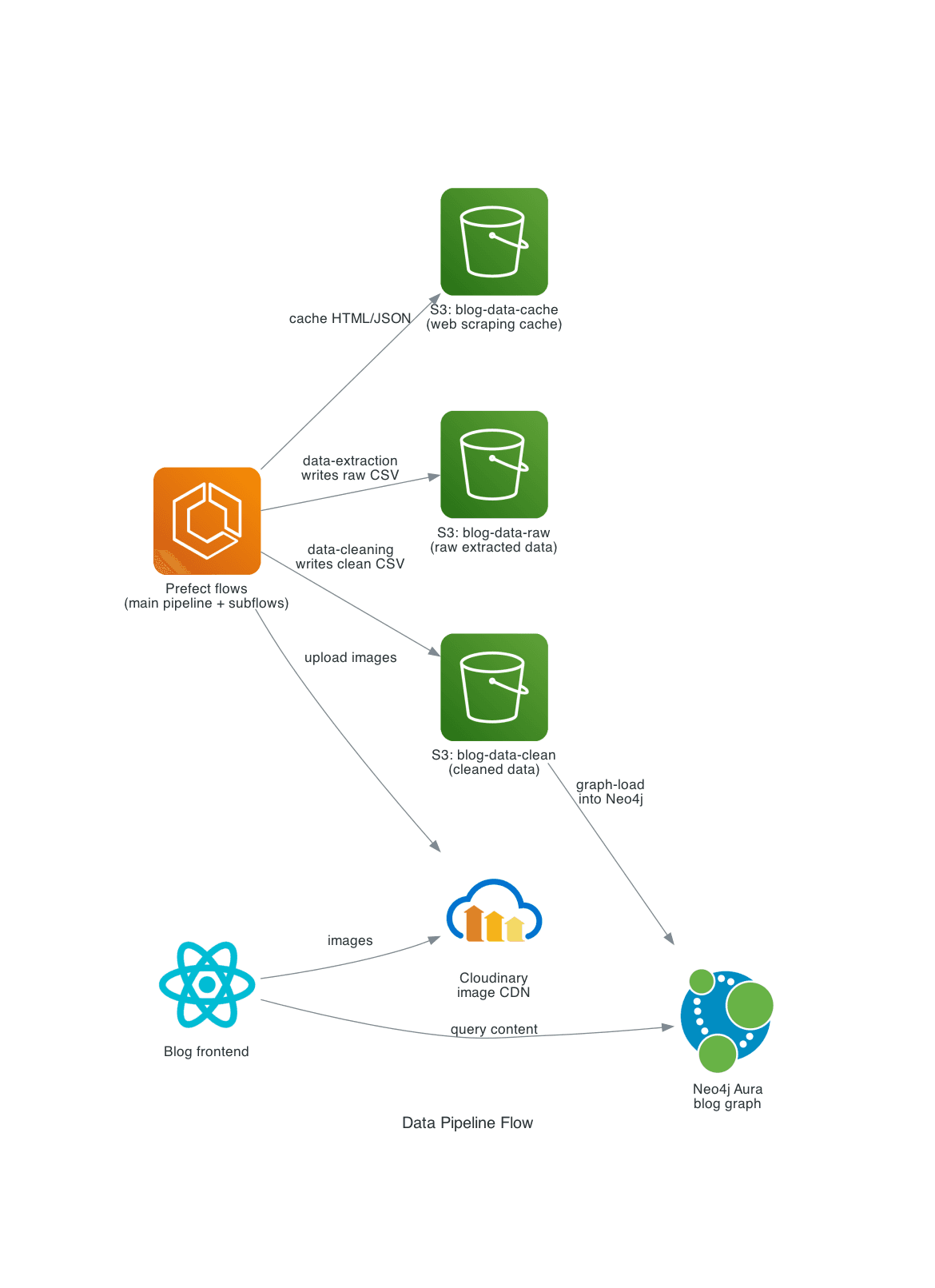
Purpose: show how Prefect flows in the data platform (data/platform) move content into storage and the graph, and how the web app consumes it.
Shows:
- Prefect flows (
data/platform) as the orchestrator data-pipelinemain flow callingdata-extraction,data-cleaningandgraph-load- S3 buckets acting as cache, raw and clean data stores
- Neo4j Aura as the graph database for rocket data
- Cloudinary as the image CDN receiving uploads from flows
- The web app (
apps/web) querying Neo4j Aura and loading images from Cloudinary
4. Design Files / .ork Processing
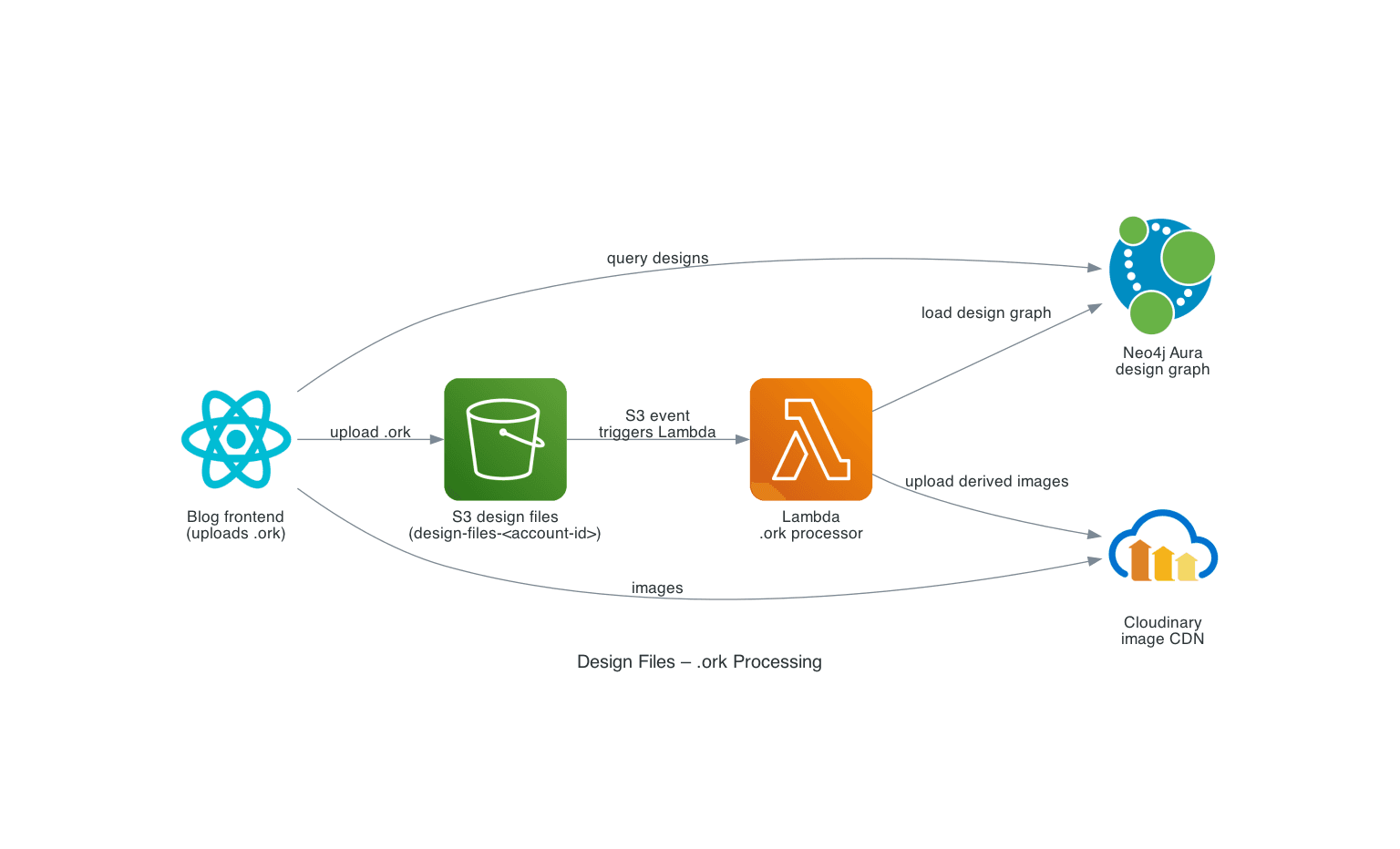
Purpose: show how OpenRocket .ork design files are processed into Neo4j and Cloudinary by a Lambda function defined in the data platform (data/platform/lambda).
Shows:
- The web app (
apps/web) uploading.orkdesign files into S3 - S3 event notifications triggering the AWS Lambda
.orkprocessor - Lambda loading design metadata into Neo4j Aura
- Lambda uploading derived images to Cloudinary for use by the web app
- The web app (
apps/web) querying design data from Neo4j Aura and loading images from Cloudinary
Note: the
.orkprocessor is one of five Lambda functions indata/platform/lambda:ork-validator,ork-processor,flight-validator,flight-processor, andvideo-overlay. This diagram focuses on the.orkdesign-file path only.
5. Security & Secrets
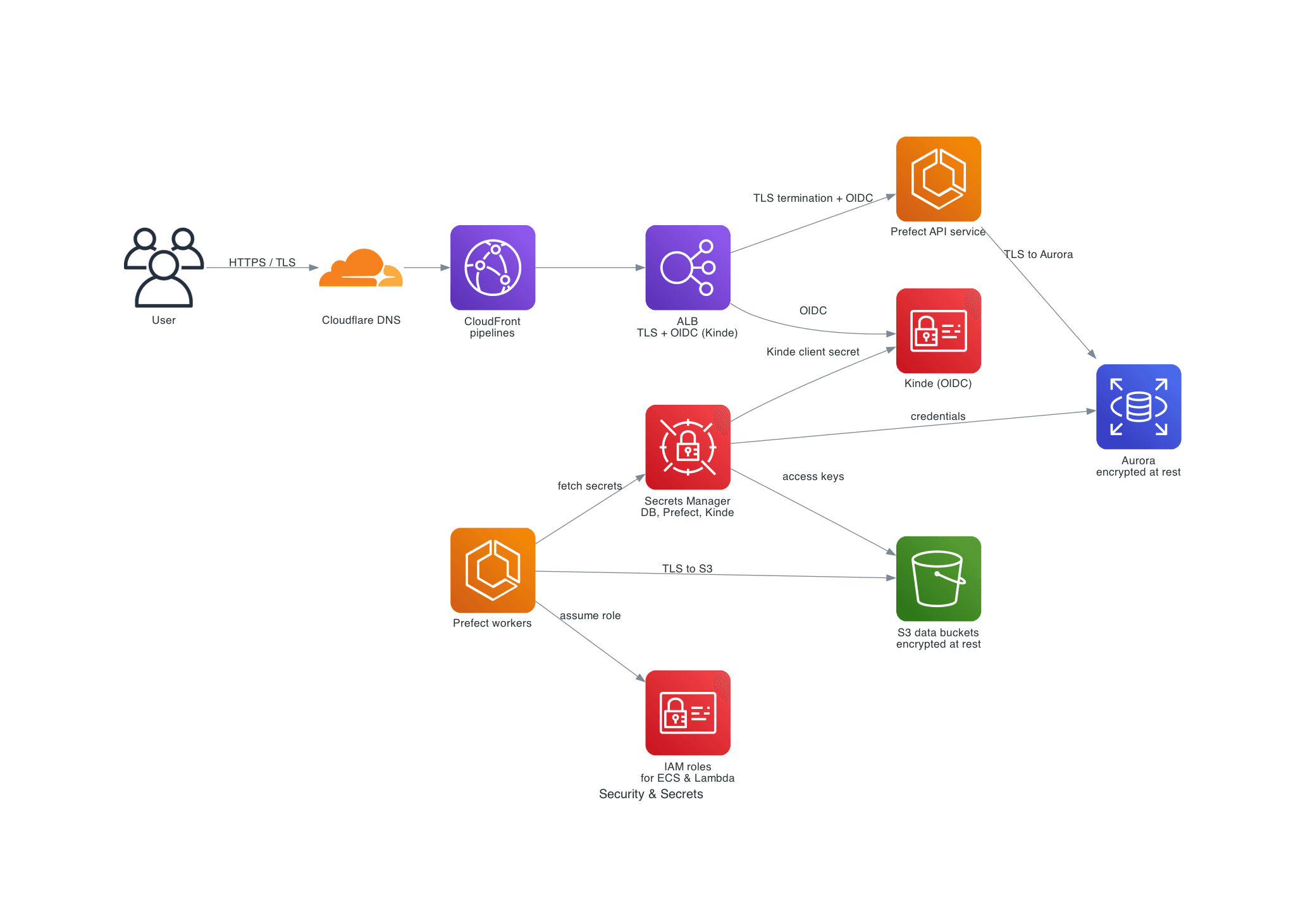
Purpose: show how TLS, IAM and Secrets Manager protect traffic and data access for the core services.
Shows:
- Cloudflare, CloudFront and the ALB handling HTTPS/TLS for pipelines
- TLS termination and OIDC at the ALB before traffic reaches ECS services
- IAM roles used by ECS workers (and Lambda) to access AWS APIs
- Secrets Manager storing DB, Prefect and Kinde/OIDC credentials
- Encryption at rest for Aurora and S3 data buckets
6. Deployment & CI/CD
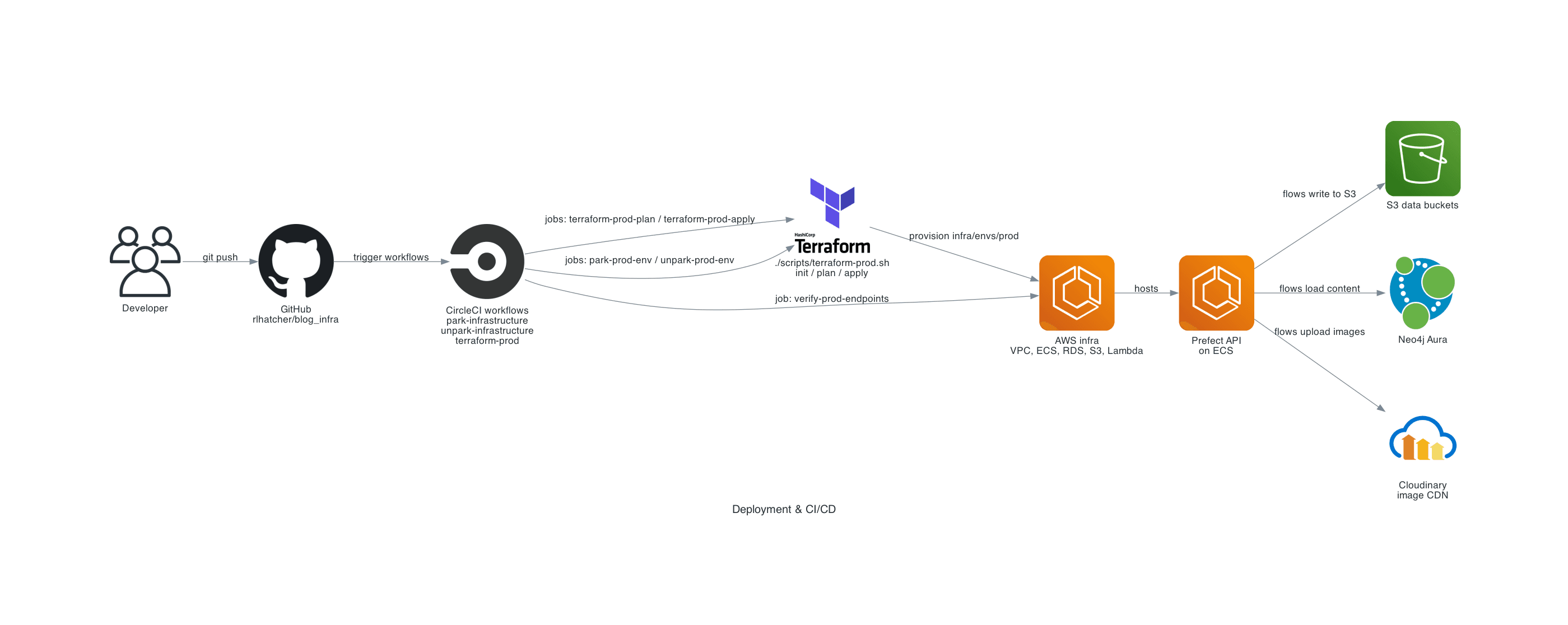
Purpose: show how this repo and CircleCI workflows provision AWS infrastructure with Terraform.
Shows:
- Developer pushes to this GitHub repository
- CircleCI workflows
park-infrastructure,unpark-infrastructure,terraform-prodandrefresh-prefect-image refresh-prefect-imageworkflow building the ECS-capable Prefect base imageterraform-prod-planandterraform-prod-applyjobs executing Terraformpark-prod-envandunpark-prod-envjobs toggling park modeverify-prod-endpointsjob checking the endpoints via CloudFront
Generating the diagrams
From the repository root:
python infra/platform/generate_architecture_diagram.py
This will create PNG files under apps/docs/public/diagrams/.
Requirements
- Python 3.11+
- The
diagramslibrary and Graphviz installed locally:
pip install diagrams
brew install graphviz  # macOS
When to update diagrams
Regenerate diagrams when you make structural changes to the infra, such as:
- Adding, removing or renaming core modules (network, ALB, CloudFront, Aurora)
- Changing application domains or routing
- Adding new ECS services or data stores
In most cases you only need to tweak infra/platform/architecture.yaml and infra/platform/generate_architecture_diagram.py, then rerun the script.