CircleCI Deployment Guide
Overview
CircleCI builds the data-platform Docker image, pushes it to ECR, and deploys flows to the
self-hosted Prefect server through the param-gated deploy-data-platform pipeline — the
migrated successor to the external blog_data repo's deploy-pipeline. The whole data-platform
deploy pipeline (flow-execution image, Prefect deployments, and the four blog-data-* Lambdas)
now lives in this monorepo's .circleci/config.yml, pointed at data/platform. See
ADR-0005.
Not on push. The pipeline runs only when the
deploy-data-platformpipeline parameter is set (likedeploy-video-overlay), never automatically on a branch push. A normal push skips it entirely.
Current Status Yes
- Yes CircleCI Configuration: Configured in
.circleci/config.yml, param-gated (deploy-data-platform) - Yes Docker Build: Multi-stage Dockerfile optimized for Python; built from
data/platform/Dockerfileby monorepo CI - Yes ECR Push: Images tagged with the monorepo commit SHA into the
blog-datarepo - Yes Prefect Deployment: Flows deployed to self-hosted Prefect server via
an internal Prefect deployer ECS task that bakes
data/platform(noblog_dataclone) - Yes IAM Permissions: CircleCI assumes
OrganizationAccountAccessRolevia STS using the sharedaws-blog-infra-prodcontext - Yes Self-Hosted Prefect: Deployed at
https://pipelines.rocketclub.online
Quick Start
For detailed setup instructions, see CircleCI Setup Guide.
Architecture
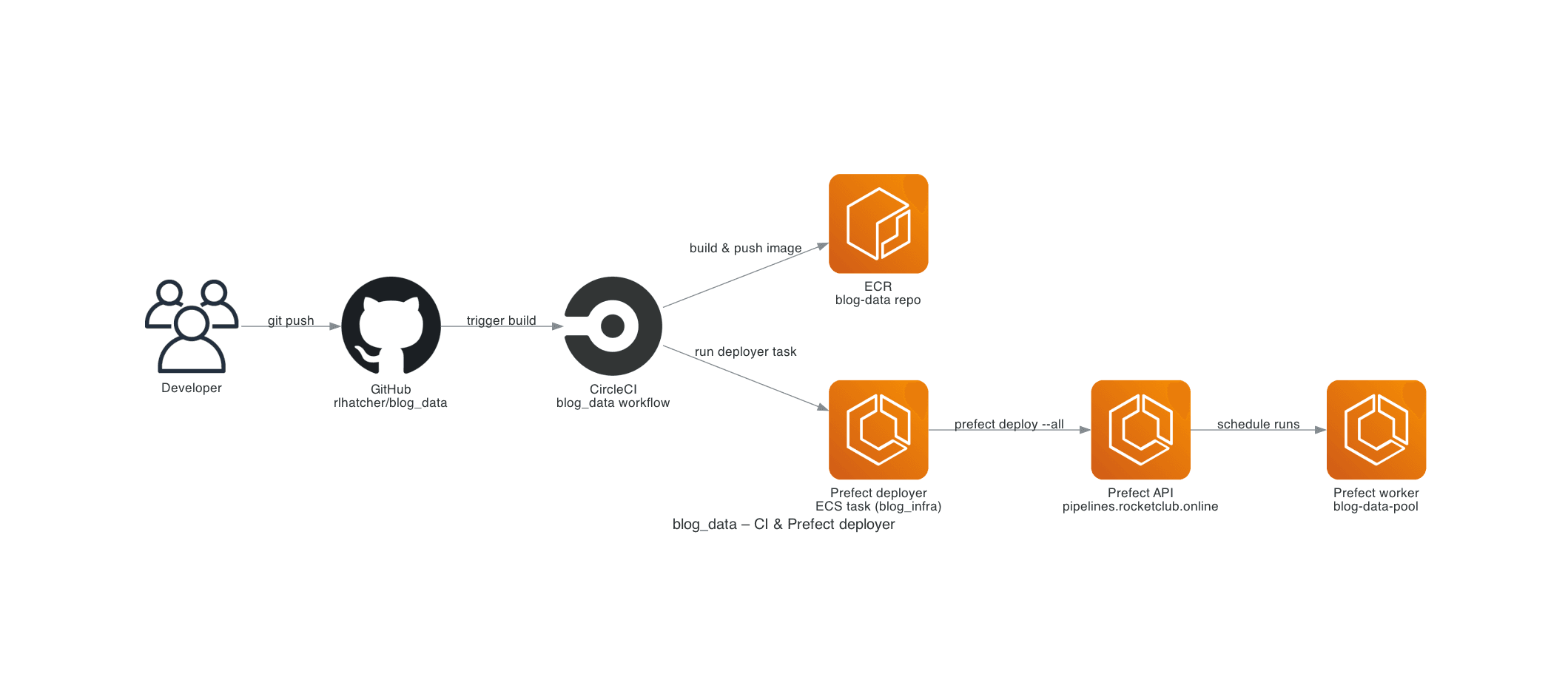
At a high level, triggering the deploy-data-platform pipeline builds the data-platform Docker
image, rolls the Prefect deployer's ECS task definition forward (Terraform), then runs the
deployer task — which registers the deployments from the baked-in data/platform — and finally
redeploys the four Lambdas:
Trigger deploy-data-platform pipeline parameter
    ↓
┌───────────────────────────────────────────────┬─────────────────────────────┐
│ build-prefect-deployer-image ∥                 │ build-data-platform-image   │
│ build-video-overlay-image                      │ (the flow-execution image)  │
│     ↓                                          │             │               │
│ terraform-prod-plan → approval →               │             │               │
│ terraform-prod-apply (rolls the deployer       │             │               │
│ task definition)                               │             │               │
└───────────────────────┬────────────────────────┴─────────────┘               │
                        ↓  (both gate deploy-to-prefect)
deploy-to-prefect  (aws ecs run-task the prod-prefect-deployer task,
                    overriding PREFECT_IMAGE_REFERENCE = the flow image)
    ↓
Prefect deployer ECS task (defined in Terraform in this repo; bakes data/platform)
    ↓
Self-hosted Prefect API at https://pipelines.rocketclub.online
    ↓
deploy-flight-lambdas  ∥  deploy-ork-lambdas   (the four blog-data-* functions)
The deployer overrides only PREFECT_IMAGE_REFERENCE (the freshly built flow-execution image)
at run-task time; that image is what the blog-data-pool ECS work pool runs for flow execution.
Visual overview: See the CI & Prefect deployer diagram under
apps/docs/public/diagrams/diagram_2_blog_data_ci_and_deployer.png.
Setup Instructions
Step 1: CircleCI Context
Ensure the aws-blog-infra-prod context exists in CircleCI and is attached to
this project's workflow. That context is responsible for providing short-lived
AWS credentials via STS; you should not configure static
AWS_ACCESS_KEY_ID / AWS_SECRET_ACCESS_KEY values on this project.
If you want the optional Prefect smoke test in the deploy-to-prefect job to
run, set PREFECT_API_URL=https://pipelines.rocketclub.online/api in that
same context.
Step 2: Verify Prefect Work Pool
Ensure the blog-data-pool work pool exists:
export PREFECT_API_URL="https://pipelines.rocketclub.online/api"

prefect work-pool ls
If it doesn't exist, create it:
prefect work-pool create blog-data-pool --type ecs
Step 3: Deploy
The pipeline is param-gated — it does not run on push. Trigger it by starting a pipeline for
rlhatcher/rocket-club with the deploy-data-platform parameter set to true (via the CircleCI
UI's "Trigger Pipeline", or the API):
curl -X POST https://circleci.com/api/v2/project/gh/rlhatcher/rocket-club/pipeline \
  -H "Circle-Token: $CIRCLECI_TOKEN" \
  -H 'Content-Type: application/json' \
  -d '{"branch":"main","parameters":{"deploy-data-platform":true}}'
A normal branch push does not run this pipeline (the deploy-data-platform parameter is in
the ci workflow's unless guard, so setting it also skips ci — no double-deploy).
Step 4: Monitor Deployment
In CircleCI
- Go to app.circleci.com
- Select your project
- Watch the
deploy-data-platformworkflow:build-data-platform-image(~3-5 minutes)terraform-prod-plan→ approval →terraform-prod-applydeploy-to-prefect(~2-3 minutes)deploy-flight-lambdas/deploy-ork-lambdas
In AWS ECR
# Verify image was pushed
aws ecr describe-images --repository-name blog-data --region eu-west-2

# Get latest image
aws ecr describe-images \
  --repository-name blog-data \
  --region eu-west-2 \
  --query 'imageDetails[0]'
In Self-Hosted Prefect Server
- Go to
https://pipelines.rocketclub.online - Log in with your credentials
- Navigate to Deployments
- Verify
data-pipeline-dailydeployment exists - Check version matches git commit hash
Configuration Files
.circleci/config.yml
The deploy-data-platform workflow (param-gated) runs, in order:
-
build-data-platform-image
- Uses the plain
machine-executor(amd64), likebuild-prefect-deployer-image - Assumes
OrganizationAccountAccessRolevia STS - Queries ECR for the
blog-datarepository URL - Builds
data/platform/Dockerfiletagged with the monorepo short SHA (skips if already pushed) - Pushes to ECR
blog-data:<SHORT_SHA>
- Uses the plain
-
build-prefect-deployer-image (∥ image builds) then terraform-prod-plan → approval → terraform-prod-apply
- Rebuilds the Prefect deployer image (which bakes
data/platform) and rolls the ECS task definition forward to the new deployer image tag, so the deployer registers the current baked flow code
- Rebuilds the Prefect deployer image (which bakes
-
deploy-to-prefect (
infra/platform/scripts/deploy-to-prefect.sh)- Assumes an AWS IAM role via STS; park-mode guarded (
/prod/infra/park_mode) - Resolves cluster / task-definition / subnets / security group from
/prod/prefect/deployer/*SSM parameters aws ecs run-tasks theprod-prefect-deployertask, overriding container envPREFECT_IMAGE_REFERENCE=<ecr>/blog-data:<SHORT_SHA>(the flow-execution image)- Waits for the task to stop, tails its CloudWatch logs, and fails the job on non-zero container exit
- Assumes an AWS IAM role via STS; park-mode guarded (
-
deploy-flight-lambdas ∥ deploy-ork-lambdas
- Run
data/platform/lambda/deploy-flight-lambdas.sh/deploy-ork-lambdas.shso one trigger updates all fourblog-data-*functions from the monorepo
- Run
data/platform/prefect.yaml
The canonical deployment configuration lives at data/platform/prefect.yaml.
Below is a simplified excerpt for the main scheduled deployment; see the file
itself for the full set of on-demand deployments and tags.
prefect-version: '>=3.0.0'
name: blog-data-pipeline

deployments:
  - name: data-pipeline-daily
    description: 'Complete data pipeline: extract → clean → load'
    schedule:
      cron: '0 2 */7 * *'
      timezone: 'America/New_York'
    entrypoint: flows/main_pipeline.py:data_pipeline_flow
    work_pool:
      name: blog-data-pool
      work_queue_name: default
      job_variables:
        image: '{{ $PREFECT_IMAGE_REFERENCE }}'
Note: Docker build/push steps are handled by CircleCI, not Prefect.
Dockerfile
Multi-stage build:
- Stage 1 (builder): Install dependencies
- Stage 2 (runtime): Copy artifacts, minimal runtime image
Key Decisions & Lessons Learned
1. ECR Tag Immutability
Issue: ECR repository has immutable tags enabled, so we can't overwrite latest tag.
Solution: Only push commit hash tags ($CIRCLE_SHA1), not latest.
2. Work Pool Type
Issue: Initially configured for ECS work pool with Docker build/push steps.
Solution: Use Prefect managed work pool (blog-data-pool) and handle Docker build/push in CircleCI.
3. IAM Permissions
Issue: ECR resource ARN pattern blog-data-* didn't match repository blog-data.
Solution: Added both exact repository name and wildcard pattern to IAM policy:
resources = [
  "arn:aws:ecr:${var.aws_region}:${data.aws_caller_identity.current.account_id}:repository/${var.project_name}",
  "arn:aws:ecr:${var.aws_region}:${data.aws_caller_identity.current.account_id}:repository/${var.project_name}-*"
]
4. Prefect Deploy Options
Issue: prefect deploy --all --no-prompt failed because --no-prompt doesn't exist.
Solution: Use prefect deploy --all without the --no-prompt flag.
Troubleshooting
"AWS credentials not found"
- Verify environment variables in CircleCI:
AWS_ACCESS_KEY_IDAWS_SECRET_ACCESS_KEYAWS_REGION
- Check variable names match exactly (case-sensitive)
"Failed to push image to ECR"
# Check ECR repository exists
aws ecr describe-repositories --repository-names blog-data --region eu-west-2

# Verify credentials have ECR permissions
aws ecr get-authorization-token --region eu-west-2
"Prefect connection failed"
- Verify
PREFECT_API_URLis correct (should end with/api) if you are running Prefect CLI locally or from CI - Check that your machine or runner can reach
https://pipelines.rocketclub.online/api - Confirm the Prefect API ECS service is healthy in AWS
"Work pool 'blog-data-pool' not found"
# Create the work pool
prefect work-pool create blog-data-pool --type ecs
"tag invalid: The image tag already exists"
This happens when trying to push latest tag to ECR with immutable tags enabled.
Solution: Only push commit hash tags, not latest.
Manual Deployment (if needed)
If CircleCI fails, deploy manually:
# Build and push image
AWS_ACCOUNT_ID=$(aws sts get-caller-identity --query Account --output text)
ECR_REPO_URL="${AWS_ACCOUNT_ID}.dkr.ecr.eu-west-2.amazonaws.com/blog-data"

aws ecr get-login-password --region eu-west-2 | \
  docker login --username AWS --password-stdin ${AWS_ACCOUNT_ID}.dkr.ecr.eu-west-2.amazonaws.com

docker build -t blog-data:$(git rev-parse HEAD) .
docker tag blog-data:$(git rev-parse HEAD) ${ECR_REPO_URL}:$(git rev-parse HEAD)
docker push ${ECR_REPO_URL}:$(git rev-parse HEAD)

# Deploy flows against self-hosted Prefect (from within the VPC or an admin machine)
export PREFECT_API_URL="https://pipelines.rocketclub.online/api"
prefect deploy --all
Monitoring
View CircleCI Logs
- UI: app.circleci.com → Project → Workflow
- CLI:
circleci workflow view <workflow-id>
View Prefect Deployments
# List all deployments
prefect deployment ls

# View specific deployment
prefect deployment inspect data-pipeline-daily
View ECR Images
# List images
aws ecr describe-images --repository-name blog-data --region eu-west-2

# Get image details
aws ecr describe-images \
  --repository-name blog-data \
  --region eu-west-2 \
  --image-ids imageTag=<commit-hash>
Next Steps
- Yes Environment variables configured in CircleCI
- Yes Pipeline tested and working
- Yes Docker images in ECR
- Yes Flows deployed to self-hosted Prefect
- ⏭️ Test flow execution from Prefect UI
- ⏭️ Monitor scheduled runs (see
data/platform/prefect.yamlfor the canonical cron schedule)