Deployment & CI for Infrastructure
This page describes how changes to the platform infrastructure are applied to AWS using Terraform and CircleCI, and how park/unpark workflows interact with the running environment.
The focus here is on infrastructure deployment for this repository (rlhatcher/rocket-club). Application release processes for application code (for example Prefect flows or a Vercel-hosted frontend) may be documented elsewhere.
High-level deployment flow
The diagram below shows the main steps when a change is made to this repository and rolled out to AWS.
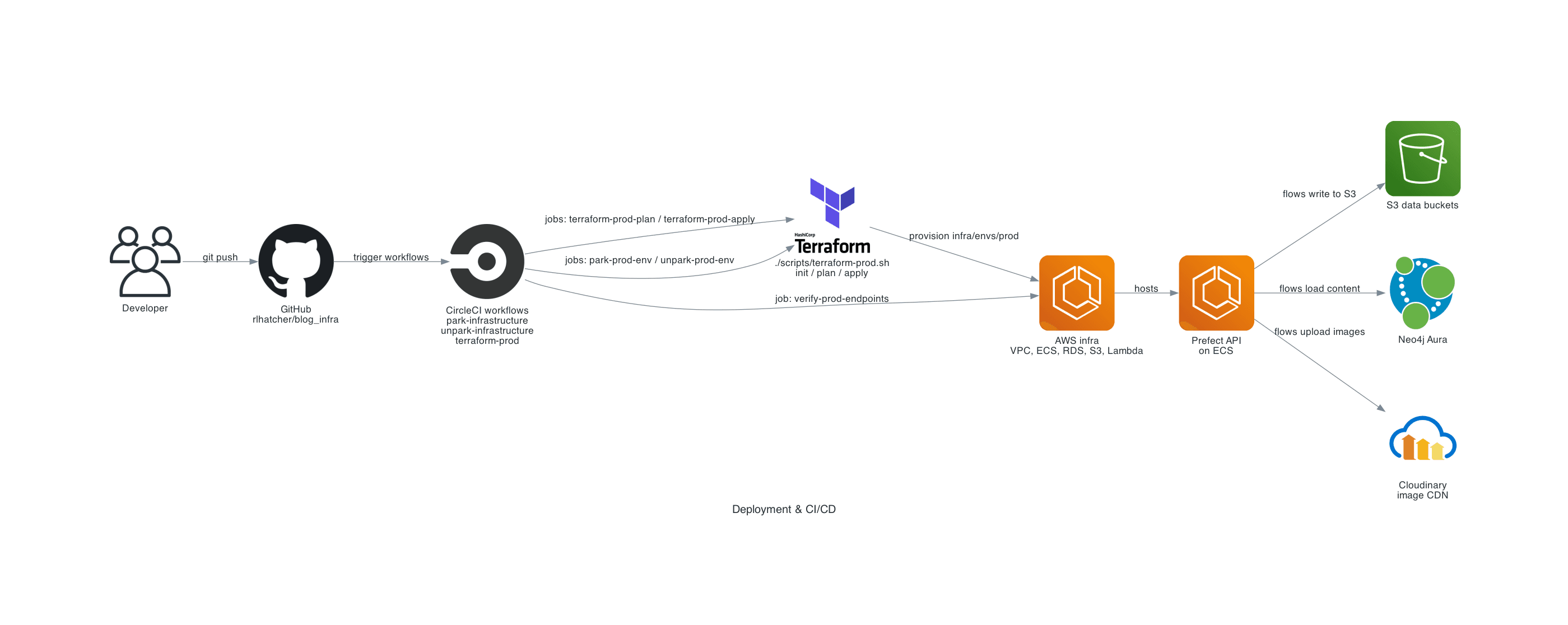
At a high level:
- A developer pushes changes to
rlhatcher/rocket-clubon GitHub. - CircleCI runs workflows that:
- Plan and apply Terraform changes against
infra/platform/infra/envs/prod. - Optionally park or unpark the environment.
- Verify that key endpoints remain healthy.
- Plan and apply Terraform changes against
- Terraform updates AWS resources (networking, ECS, RDS, S3, IAM, Lambda, etc.) according to the modules in this repo.
Terraform entrypoints
Terraform for production infrastructure is managed via a single root module:
- Root:
infra/platform/infra/envs/prod - Wrapper script:
infra/platform/scripts/terraform-prod.sh
The wrapper script is invoked by CircleCI jobs to run init, plan and apply with a consistent set of options and backend configuration.
CircleCI workflows
The following workflows are responsible for provisioning and managing infrastructure defined in this repository.
| Workflow name | Purpose |
|---|---|
terraform-prod | Plan and apply Terraform changes to prod |
park-infrastructure | Apply configuration that parks the environment |
unpark-infrastructure | Restore the environment from parked state |
refresh-prefect-image | Build/push the ECS-capable Prefect base image |
deploy-data-platform | Param-gated: build the flow image, roll the deployer task def, run the Prefect deployer, and redeploy the four blog-data-* Lambdas |
These workflows are configured in the CircleCI config for this repository. deploy-data-platform
is the migrated successor to the external blog_data repo's deploy pipeline (see
ADR-0005);
it runs only when its pipeline parameter is set, never on push.
Terraform jobs
Within the terraform-prod workflow, the primary jobs are:
| Job name | What it does | Notes |
|---|---|---|
terraform-prod-plan | Runs infra/platform/scripts/terraform-prod.sh init/plan | Generates a Terraform plan for review |
terraform-prod-apply | Runs infra/platform/scripts/terraform-prod.sh init/plan/apply | Applies the approved plan to AWS |
verify-prod-endpoints | Smoke checks against pipelines via CloudFront | Ensures core surfaces are reachable |
The apply step typically requires manual approval in CircleCI before running in production.
Park/unpark jobs
To reduce costs when the environment is not in active use, this repository supports park mode:
| Workflow / job | What it does |
|---|---|
park-infrastructure / park-prod-env | Scales down or disables non-essential compute resources while keeping core stateful services intact |
unpark-infrastructure / unpark-prod-env | Reverses park mode changes and restores normal capacity |
The exact set of resources affected by park/unpark is defined in Terraform variables and modules within this repository. Stateful components such as Aurora and critical S3 buckets remain available so that data is not lost.
Responsibilities and boundaries
From an infra point of view:
- This repository is the source of truth for AWS infrastructure used by the Prefect access surface, data platform buckets, Lambda ork processor and related IAM/Secrets.
- CircleCI is responsible for executing Terraform plans and applies in a controlled, auditable way, including park/unpark operations.
- Application code and deployments elsewhere in this monorepo (for example Prefect flows in
data/platformor the web app inapps/web, deployed on Vercel) consume this infrastructure but have their own release pipelines and should not modify core infra directly.
Relationship to other repositories
Only this repository's Terraform is managed by the workflows and jobs described above. Other application code and repositories that consume this infrastructure have their own build and deployment pipelines and are not deployed by these CircleCI workflows.
When making infrastructure changes, update the Terraform modules under infra/platform/infra, run terraform plan locally if needed, and then rely on the terraform-prod workflow to apply changes to production.
Prefect images and immutable ECR tags
The blog-data ECR repository is used to host both the base Prefect image and a small Prefect deployer image that runs prefect deploy --all inside the VPC on ECS.
- The base Prefect image is built from the official Prefect 3 Docker Hub image by the
refresh-prefect-imageworkflow and tagged asprefect-3-python3.12-ecs - The Prefect deployer image is built by the
build-prefect-deployer-imagejob and tagged asprefect-deployer-3-python3.12-<rocket-club_short_sha>. It bakes the monorepodata/platforminto the image (built with a repo-root context) and runsprefect deploy --allfrom that baked-in code — it no longer clones the externalblog_datarepo.
This scheme has important properties:
- Immutable tags: the ECR repository is configured with
imageTagMutability=IMMUTABLE, so tags are never moved once pushed. - Concrete, reproducible mapping: each deployer image tag encodes the
rocket-clubcommit that defined how the image was built. - Terraform is explicit: the prod environment pins both images via locals in
infra/platform/infra/envs/prod/main.tf.
There is intentionally no mutable latest tag for the deployer image.
Running the refresh-prefect-image workflow
Use the refresh-prefect-image workflow when you need to rebuild the base Prefect image. The workflow will:
- Build
infra/platform/docker/prefect-base-ecs/DockerfileFROM the official Prefect 3 image. - Install
prefect-aws[ecs]so ECS workers can runprefect worker start --type ecs. - Push the result to the
blog-dataECR repository asprefect-3-python3.12-ecs.
To run it in CircleCI:
- Start a new pipeline for
rlhatcher/rocket-clubon the desired branch. - Set pipeline parameters:
refresh-prefect-image-mode: true,terraform-prod-mode: false. - Once the workflow completes, the tag is available in ECR.
Discovering the latest Prefect deployer image tag
To find the most recently pushed Prefect deployer image tag:
aws ecr describe-images \
  --repository-name blog-data \
  --region eu-west-2 \
  --query 'reverse(sort_by(imageDetails, &imagePushedAt))[0].imageTags' \
  --output text
Then update infra/platform/infra/envs/prod/main.tf so local.prefect_deployer_image references that concrete tag and run the terraform-prod workflow to roll the ECS task definition forward.